Xavier Slim

Updated 4 months ago

Efficient Extraction of macOS DMG Files

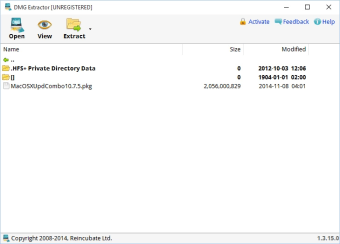
DMG Extractor, developed by Reincubate Ltd, is a practical DMG extraction tool designed to open and retrieve the contents of macOS disk image files on other systems. It focuses on simplicity, letting users easily browse and extract data from .dmg archives without the need for conversion or complex setup. Its read-only functionality ensures file safety by preventing accidental modification of the original image.

Top Recommended Alternative

A Convenient Interface for Seamless Use

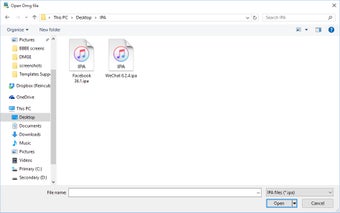
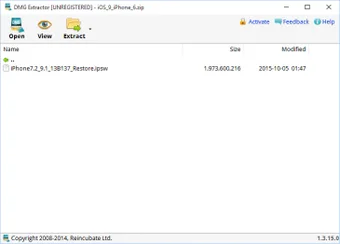
The program excels in its primary function—extracting DMG files efficiently. Users simply open a DMG, choose an output folder, and start extraction. This straightforward process makes it accessible to anyone needing quick access to macOS archives. While the interface is intuitive, its dated design and limited visual polish make it feel basic compared with newer utilities. Even so, DMG Extractor performs reliably and remains lightweight, favoring function over form.

Practical but Limited Free Version

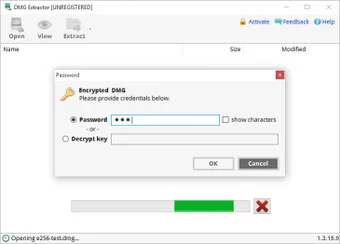
The software’s free edition allows users to extract up to five files or 4 GB of data per session. For most light tasks, this is sufficient, though it restricts heavy or repeated use. The free build also lacks support for encrypted DMG files, which are reserved for the paid version. The premium license removes these limits, enabling full access to large or protected images and making it suitable for users who frequently handle macOS installers or archives.

Simple Tool with Competent Alternatives

While DMG Extractor is an effective read-only solution, it does not create, edit, or mount DMG files. Users needing more versatility may prefer 7-Zip, TransMac, or Universal Extractor, which handle a broader range of archive formats and add features like compression or encryption management. For straightforward extraction, however, DMG Extractor remains a reliable, purpose-built option.

Functional Yet Basic Extraction Utility

In conclusion, DMG Extractor offers a focused way to open and retrieve content from macOS DMG files. It performs its core job well, but its limited free mode and lack of advanced functions keep it best suited to users needing quick, one-off DMG extraction rather than all-purpose archive management.


Xavier Slim

Xavier Slim has experience in English writing supported by academic recognition and creative competitions. He has worked on tutoring and editorial projects, developing content that balances clarity with creativity. His interests in writing and technology inform his practical approach to reviewing digital tools.

  • Pros

    • Simple and clear interface for quick extraction
    • Reliable read-only access to DMG archives
    • Handles large (4 GB+) files efficiently
    • Lightweight and easy to install
  • Cons

    • Free version capped at five files or 4 GB
    • No editing, creation, or mounting features
    • Dated interface design
    • Encrypted DMGs require paid version
 0/4

App specs

Program available in other languages


Icon of program: DMG Extractor

DMG Extractor for PC

  • Free
  • 2.7
    209
  • 307.8K
  • V1.3.20.6

User reviews about DMG Extractor

2.7

1 reviews

Add review

Main reviews for you

  • Anonymous user

    Extract DMG files without having to convert them to ISO or IMG files.. Really nice tool if you need to open DMG files, it automatically extracts the contents of DMG packs onto the computer. Pros: Fast toolEasy to use, friendly interface

More

You may also like

Alternatives to DMG Extractor

Explore Apps

Latest articles

Laws concerning the use of this software vary from country to country. We do not encourage or condone the use of this program if it is in violation of these laws.
Softonic

Is DMG Extractor safe?

99/100

Score result: Clean

This file passed a comprehensive security scan using VirusTotal technology. It is safe to download.

  • Virus free
  • Spyware free
  • Malware free
  • Verified by Security Partners

    VirusTotal logo

Scan Info

Last scan
Wednesday, July 3, 2024
Scan provider
VirusTotal · Full report

File Integrity

File
DMG_Extractor_V1.3.20.6.exe
SHA256
ef0f7554c24c331c80dbf2af9c0746978f114c1dfac1579556d05064a0076269
SHA1
2057344569a400806ebe3f23fa607621e1a52f95

Softonic security commitment

DMG Extractor has been thoroughly scanned by our advanced security systems and verified by industry-leading partners. This file comes from the official developer and has passed all our security checks, showing no signs of viruses, malware, or spyware. For more information, visit our Security and Trust Center